01 / 08Daily expense tracker
Your spending.
In plain sight.
Track daily expenses and see what’s left this month.

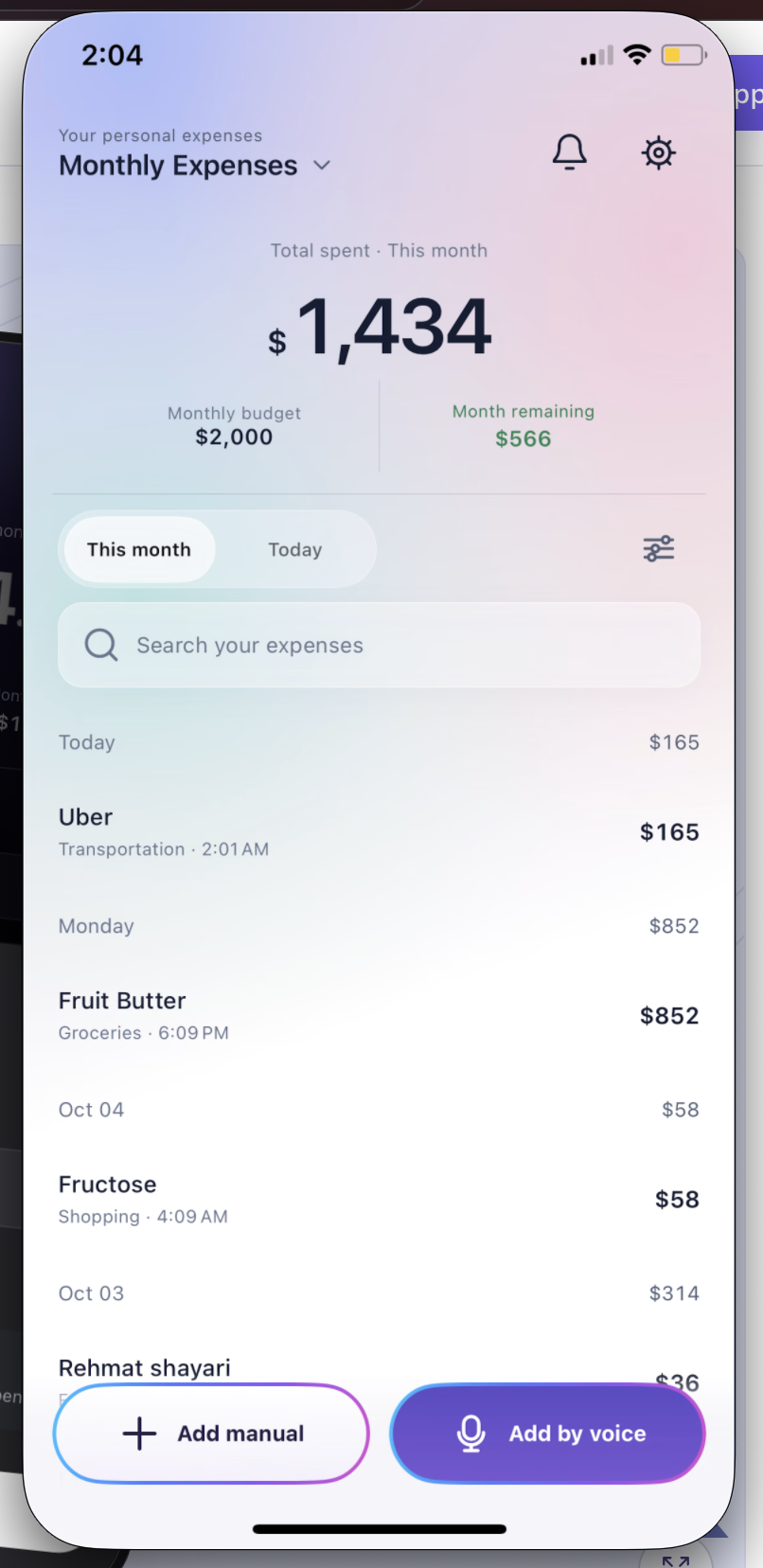
Budget Planner BPT monthly expense tracker showing $1,434 spent, a $2,000 budget and $566 remaining.
Budget Planner BPT · iPhone & Android app
Keep it short. Say “KFC 20”.Just the name and amount. No long sentences.
Personal budgets. Shared trips.
One simple place.
Track everyday spending, manage your budget, and keep shared trip expenses clear without messy calculations.
Simple money tracking
01 / 08Daily expense tracker
Track daily expenses and see what’s left this month.
Budget Planner BPT monthly expense tracker showing $1,434 spent, a $2,000 budget and $566 remaining.
02 / 08Split trip expenses
Keep trip expenses together, with one clear share for every friend.

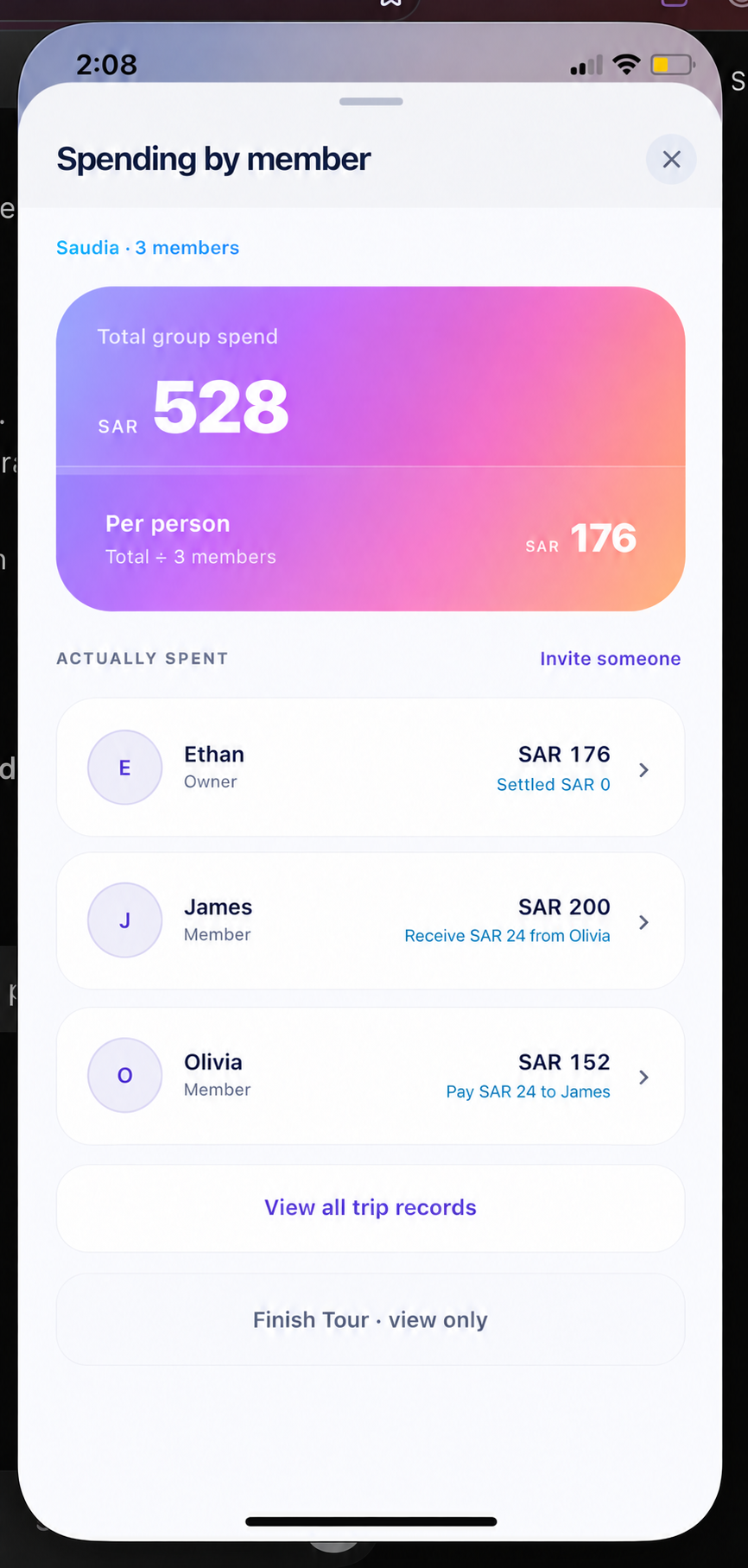
Shared trip expense breakdown for Ethan, James and Olivia: SAR 528 total and SAR 176 each; Olivia owes James SAR 24.
03 / 08Add an expense
Add the amount and a note, then get on with your day.

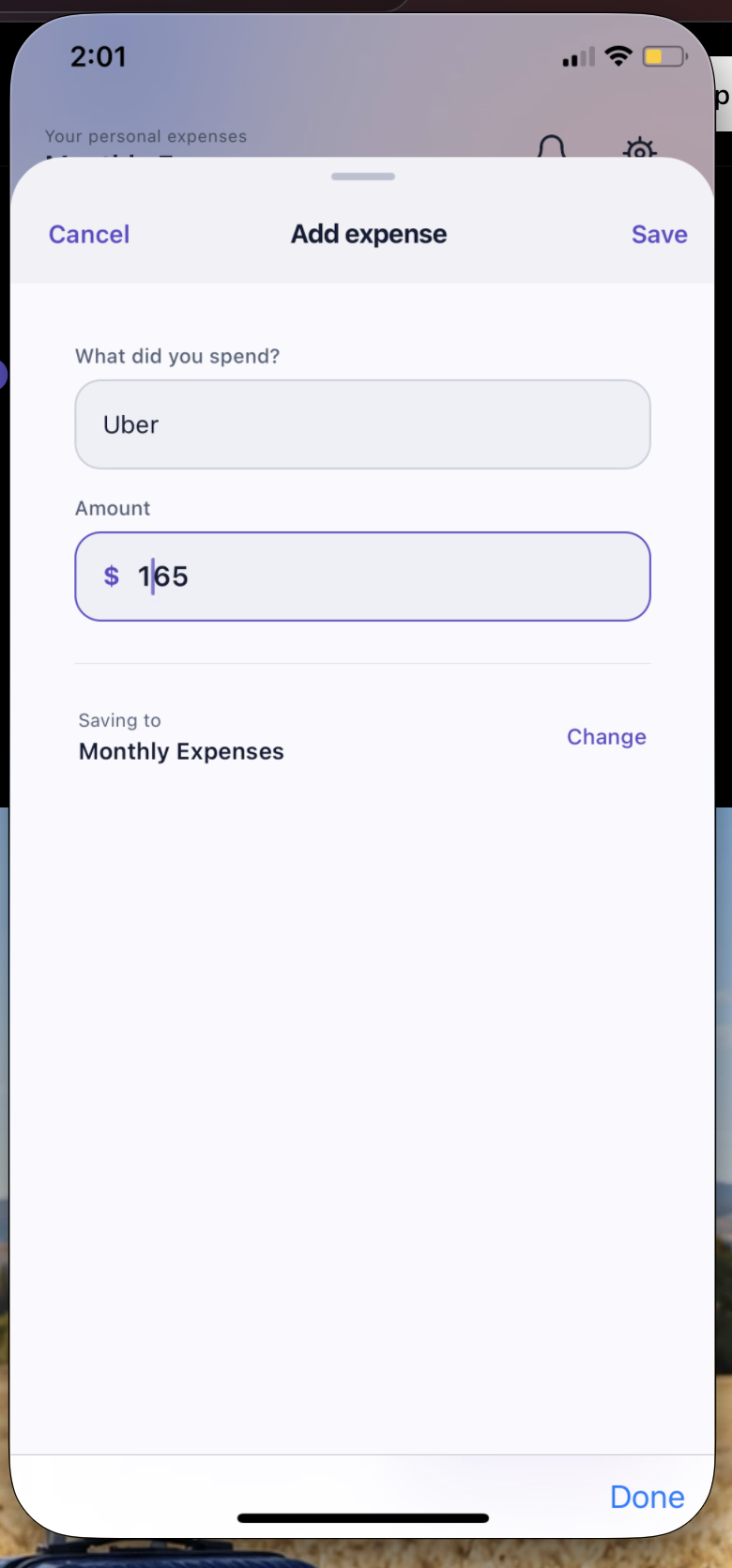
Add an Uber expense of $165 to the Monthly Expenses space using manual expense entry.
04 / 08Shared expense balances
See who owes whom and keep each friend’s balance clear.

Shared trip expense breakdown for Ethan, James and Olivia: SAR 528 total and SAR 176 each; Olivia owes James SAR 24.
05 / 08Monthly budget planner
Set your budget and know how much you can still spend.

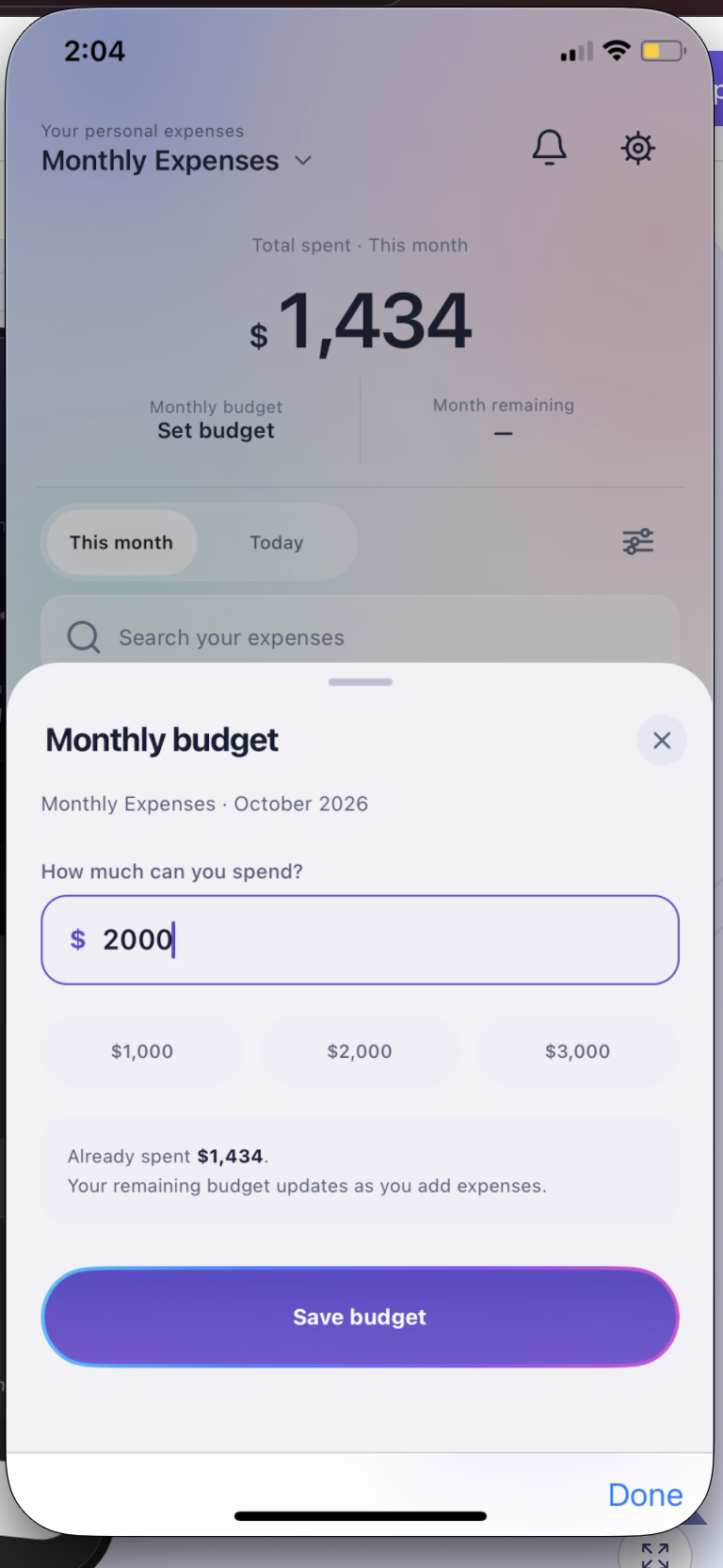
Monthly budget planner with a $2,000 budget, quick amount choices and a Save budget button.
06 / 08Expense categories
Give groceries, meals and everyday purchases the right category.

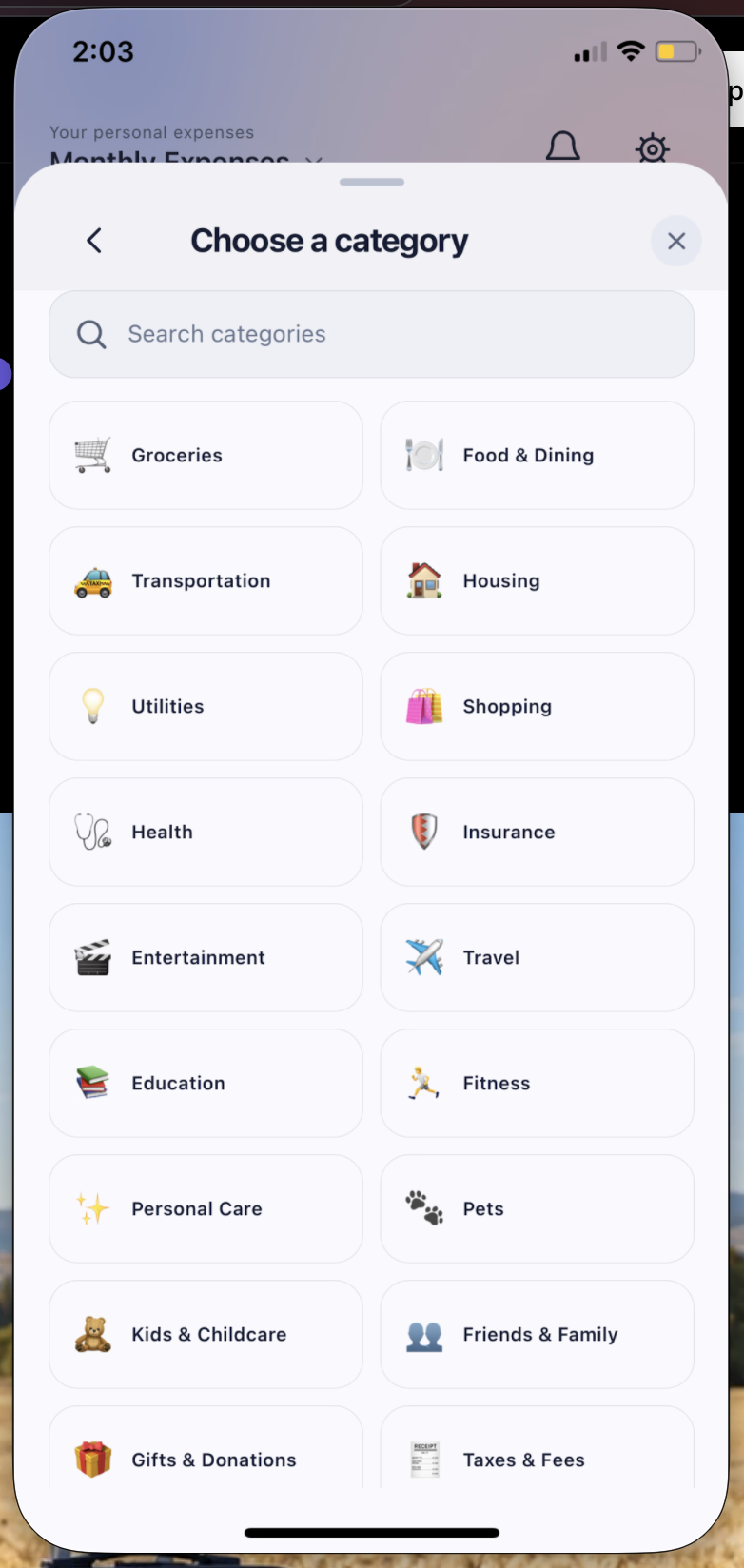
Choose an expense category including groceries, food and dining, transportation, housing and shopping.
07 / 08Expense history & filters
Filter by date and category to find the expenses you need.

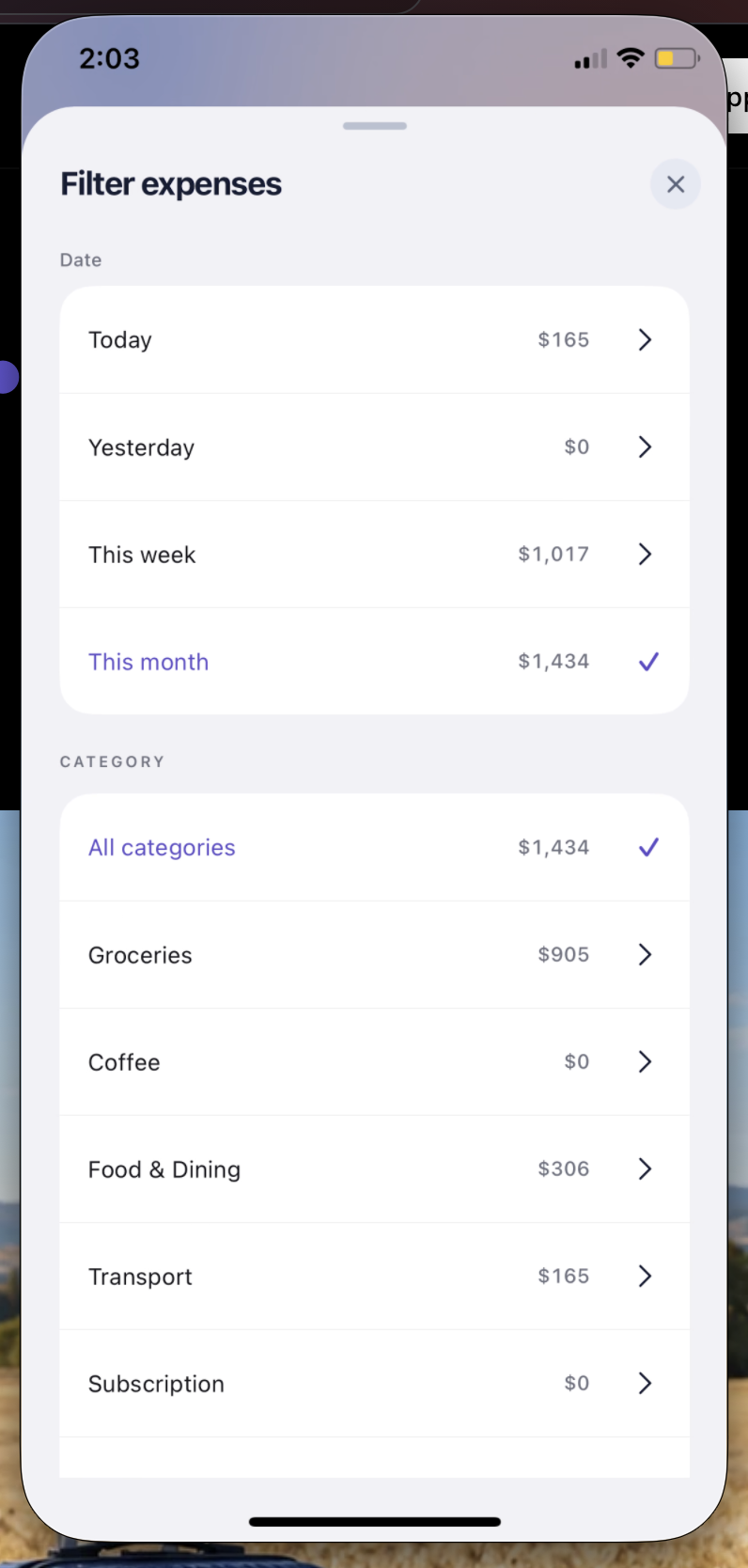
Filter expenses by today, yesterday, this week, this month and spending category in Budget Planner BPT.
08 / 08Voice expense entry
Keep it short. Say “KFC 20”.Just the name and amount. No long sentences.

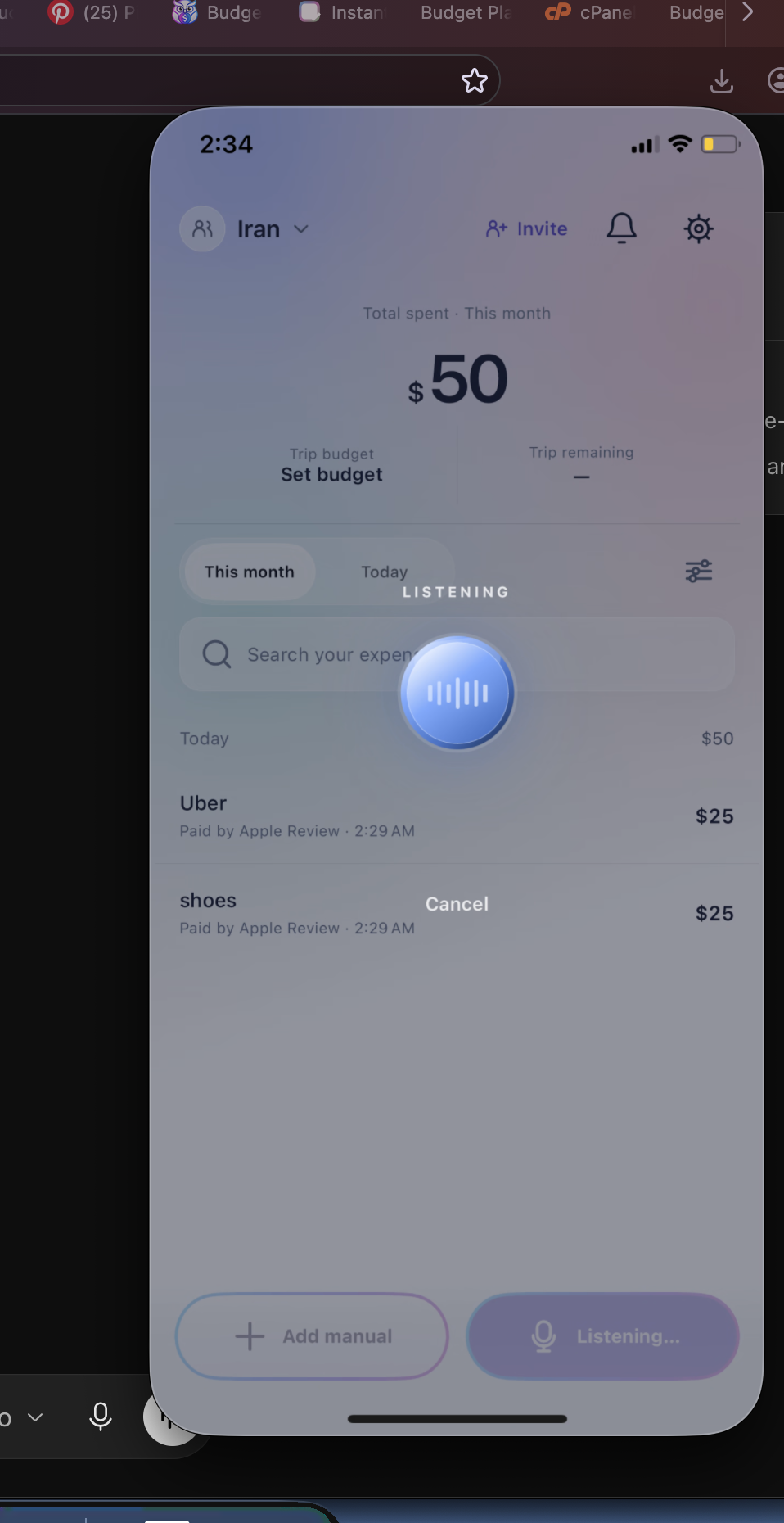
Budget Planner BPT listening for a spoken expense, with a blue voice waveform orb and Cancel control over the existing expense list.
Illustrative scenes · Example app data
Track personal budgets, shared trips, and group expenses in one clear place.
Keep every shared trip expense in one clear place.
Quickly log meals, transport, shopping, and everyday purchases.
See who paid, what was spent, and where the money went.
Compare what each friend paid and see the amount they need to give or receive.
Shared trips, minus the spreadsheet
One friend paid for the hotel. Someone else covered dinner. Another booked the taxis. Record each group expense in Budget Planner BPT, then see who paid and what each person owes.
Explore shared tripsPersonal finance, made clearer
Budget Planner BPT brings monthly budget planning and daily expense tracking into one app for iPhone and Android. Record purchases, organize expense categories and review your spending history with clear date and category filters. If you want to plan first, use the free monthly budget template or the monthly budget calculator.
For shared plans, keep group expenses in a separate space. Use the trip expense tracker and member balance breakdown to see who paid, what each person’s share is and who owes what. For a one-time equal split, try the trip expense split calculator.
Budget Planner BPT is a budget planner and expense tracker app for iPhone and Android. It helps you record daily spending, plan monthly budgets and organize shared expenses with friends.
Add the purchase and amount manually, or use English voice entry and review the result before saving. Your recorded expenses appear in your spending history.
Yes. Set a monthly spending amount, record your expenses and check the remaining budget. The budget screen also offers quick amount choices.
Keep group expenses in a shared space and record who paid. The member breakdown shows each person’s share and who needs to give or receive money. Pay each other using your usual payment method.
Yes. Keep hotel, meals, transport and other shared trip expenses together. Check the group total, each member’s spending and the balance between friends.
Yes. Review today, yesterday, this week or this month, then narrow the list by an expense category such as groceries, dining or transport.
Yes. Use personal and shared expense spaces for different plans. The space list shows the name, currency and whether a space is private or shared.
Your spending, finally simple
Keep it short. Say “KFC 20”.Just the name and amount. No long sentences.
US reference pricing: $1.99/month or $19.99/year on Google Play; effective in the App Store October 30, 2026. Eligible users may receive a 7-day free trial. Apple or Google Play determines eligibility and shows the final localized price and currency before purchase. Cancel anytime through your store subscription settings.
Last updated: October 29, 2026
This policy explains how Budget Planner BPT (iOS bundle ID and Android package com.numa.finance) handles information in the app and at budgetplannertracker.com. Contact hocainsali@gmail.com with privacy questions.
For your account, we use your account identifier, name and email address as provided by Sign in with Apple, Google sign-in, or an email sign-in option where offered. We do not need your Apple or Google password. We handle the spaces, budgets, expenses, categories, amounts, dates, currencies, notes, member identities, invitations, join requests, balances and settlements that you create or receive. This information lets us show records, calculate summaries, synchronize data and provide the sharing you choose.
If you enable shared notifications, we use a device identifier and push token to deliver them. Service and security records may include technical request details. We do not directly collect or store bank-login credentials or payment-card numbers.
Personal data is stored on your device for offline-first use. Relevant account and financial records synchronize to Supabase when a connection is available. Shared-space records are stored in the cloud so approved members can access them. Signing into the same account on another supported device may restore records that reached the cloud. A device-only record that has not synchronized may not be recoverable after device or app-data loss. People in a shared space can see that space's members and expenses; share invite links only with intended recipients.
When you choose Add by voice, the app requests microphone and speech-recognition permission. Apple's speech-recognition service may process audio to produce text, depending on device and service availability. An on-device fallback may download a model from Hugging Face; its temporary recording is removed after processing. The app parses recognized text into an expense suggestion. Text you choose to save becomes an expense record and may synchronize like a manual entry. Raw recordings are not stored in Budget Planner's finance database.
Apple handles App Store payments on iOS and Google Play handles Android subscription payments. Eligible users may receive a 7-day free trial through the relevant store after confirming a subscription. The store determines trial eligibility and displays the available offer, final localized price and currency. Budget Planner and its verification service process signed Apple transaction data or Google Play purchase tokens, product and subscription status, and an account identifier to grant or revoke access and handle store notifications. We do not receive your full payment-card number.
Apple provides iOS distribution, App Store purchases and speech recognition. Google provides Android distribution, Google Play purchases and can provide sign-in. Supabase provides authentication, cloud storage, synchronization and entitlement records. Netlify hosts the website and Budget Planner's server-side Apple and Google Play purchase and notification verification. If you enable push notifications, Expo processes push tokens and delivery information. Hugging Face may serve the on-device speech-model download. We do not sell your app financial data or use it for cross-app advertising tracking.
The interactive website preview uses sample data; it does not create an app account or save demo expenses to the app cloud. Your browser may store a display preference. Netlify processes ordinary website requests, and Google Analytics measures website usage separately from the iOS app. If you email support, we receive your address and the information you send so we can respond. Please do not email passwords, codes, card numbers or complete financial records.
We keep account, cloud and shared records while needed to provide the service, address support or security issues, and meet applicable obligations. In the app, use Settings → Delete Account and confirm the prompts to request deletion of your account and associated personal cloud data. This also removes spaces you own. Contributions you made in a space owned by someone else may remain there attributed to a “Deleted member” to preserve that group's history and balances.
The app clears local account data as part of deletion; if device cleanup cannot finish, remaining local cache may require removing the app. Providers such as Apple and Google retain their own records under their policies, and limited records may remain where legally required or needed for security or accounting. Deleting your app account does not cancel an App Store or Google Play subscription. Contact hocainsali@gmail.com if you need deletion help.
You can change microphone, speech-recognition and notification permissions in iPhone Settings, manage subscriptions through Apple or Google Play, and delete your app account in Settings. Depending on where you live, you may have rights to access, correct or delete information or object to certain processing. Contact hocainsali@gmail.com to make a request; we may need to verify your identity.
We use account access controls and service-provider security features, but no system is completely secure. The app and its providers may process data in countries other than yours. Applicable local privacy rights continue to apply.
The app is not designed for children to use without a parent or guardian. If you believe a child provided personal information contrary to applicable requirements, contact hocainsali@gmail.com so we can review it.
We may update this policy when the product, providers or legal requirements change. The current wording and update date will appear here, with additional notice where required.
Last updated: October 29, 2026
Budget Planner BPT is free to download. Optional auto-renewable subscriptions are purchased through the Apple App Store or Google Play, not this website.
New US reference prices: $1.99/month and $19.99/year. These prices are current on Google Play; the App Store price change takes effect October 30, 2026. Eligible users may receive a 7-day free trial on either existing subscription. Apple or Google Play determines trial eligibility and shows the available offer, final localized price, currency and billing period before purchase. A trial is not guaranteed for every account.
Unless cancelled through the relevant store, subscriptions renew automatically at the price and billing period shown before purchase. Purchase and Restore Purchases grant app access after transaction verification. An expired, refunded or revoked subscription may end paid access.
For App Store purchases, on iPhone open Settings → your name → Subscriptions → Budget Planner BPT → Cancel Subscription, if available. For Google Play purchases, open Google Play → profile → Payments & subscriptions → Subscriptions → Budget Planner BPT → Cancel subscription. See Apple's cancellation instructions for Apple device details. Cancellation normally prevents a future renewal; paid access may continue to the period end, subject to the status the relevant store reports. Deleting the app or its account does not cancel a store subscription.
For App Store purchases, request a refund at reportaproblem.apple.com. Apple's official guidance explains the Apple process. For Google Play purchases, use Google Play's applicable refund request process. Each store determines refund eligibility under its policies. We cannot promise or directly issue a refund for a store-processed purchase. A refund or revocation may change app access when the store reports it.
If an active purchase is missing, check the Apple Account or Google Account used for the purchase, then tap Restore Purchases in the app. If it remains missing, contact hocainsali@gmail.com with a brief description and non-sensitive receipt reference. Never email any password, verification code or card details.
Last updated: October 29, 2026
These terms apply to Budget Planner BPT and budgetplannertracker.com. By using them, you agree to these terms and the Privacy Policy. Contact hocainsali@gmail.com with questions.
Use the service only if you can lawfully agree to these terms, or with a parent or guardian where required. Keep your account access secure. You are responsible for activity under your account and for information you enter or share. Tell us at hocainsali@gmail.com if you suspect unauthorized access.
The app helps record personal and shared budgets and expenses, including group or trip spending, who paid and member balances. It does not move money or settle debts. Calculations, voice transcription and category suggestions may be wrong. Review records before relying on them or paying someone. The service is not financial, investment, tax, legal or credit advice.
The app is free to download. Optional auto-renewable subscriptions are purchased through the Apple App Store or Google Play. The new US reference prices are $1.99/month and $19.99/year. Google Play uses these prices; the App Store changes take effect October 30, 2026. Eligible users may receive a 7-day free trial through the relevant store. Apple or Google Play determines eligibility and displays the available offer, final localized price and currency before purchase. Subscriptions renew automatically unless cancelled through the relevant store. The store handles purchase confirmation, billing, renewal, cancellation and applicable refunds. App access starts after transaction verification. Cancelling a subscription does not delete your Budget Planner account or data. See Refunds & Cancellation.
Some personal records can be used on-device while offline and synchronize when service returns. Shared features, account verification and subscriptions require network services. An unsynced device-only record may be lost if the device or app data is lost. We do not guarantee uninterrupted service, perfect calculations or recovery of every record. Keep independent records where needed.
Do not use the service unlawfully, access another account or space without authorization, abuse invites or notifications, transmit harmful content, interfere with security or availability, or misuse the software. We may restrict access to address serious abuse, security risks or legal requirements.
We and our licensors retain rights in the app, website, branding and software. You receive a limited, personal, non-exclusive right to use the service while complying with these terms. Your own financial content remains yours, subject to the permission needed to provide the service.
You can stop using the service and request account deletion in Settings → Delete Account. Deletion removes owned spaces but may leave anonymized contributions in another person's shared space. Removing the app or deleting its account does not cancel an App Store or Google Play subscription; cancel through the relevant store separately. We may suspend accounts for serious abuse or legal requirements, subject to applicable rights.
To the extent permitted by law, the service is provided without a guarantee of uninterrupted operation, error-free data or suitability for a particular financial decision. We are not responsible for losses caused by inaccurate user entries, actions of other members, unavailable networks or records that never synchronized, except where applicable law makes us responsible. Nothing here limits non-waivable consumer rights or liability that cannot legally be limited.
Mandatory consumer and privacy protections in your location continue to apply. Disputes are subject to applicable law and jurisdiction under those mandatory rules; these terms do not waive non-waivable rights. Contact Budget Planner BPT at hocainsali@gmail.com for operator or legal questions.
We may change the service or these terms as needed. Updated terms and their date will appear here, with additional notice where required. Continued use after a change takes effect means the updated terms apply where permitted by law.
Email hocainsali@gmail.com with a brief description, your device model, app version and what you already tried. Never send passwords, verification codes, payment-card numbers or complete financial records.
Use the same Apple, Google or available email sign-in method you originally used. If login fails, check your connection and the sign-in provider's account status. Contact us if you cannot get back into your account.
Personal entries can be saved locally while offline and synchronize when a connection is available. Shared spaces need a working connection. Check that you are signed into the right account before changing devices. An entry that never synchronized may not be recoverable if device data is lost.
For Add by voice, allow microphone and speech recognition in your device settings. Speak a short expense name and amount in English, then review the recognized amount and category before saving.
If an invitation or join request is missing, check that both people are online and signed in, that the invite link is current, and that the owner has approved the request where required. Review member balances together; the app does not transfer money.
Budget Planner BPT is free to download on iOS and Android. The new US reference prices are $1.99/month and $19.99/year; Google Play uses them and the App Store changes take effect October 30, 2026. Eligible users may receive a 7-day free trial. Apple or Google Play determines eligibility and shows the final localized price and currency before purchase. Subscriptions renew automatically unless cancelled through the relevant store. If paid access is missing, check the purchasing store account and tap Restore Purchases in the app. Contact us if it still does not appear.
For Apple purchases, manage or cancel under iPhone Settings → your name → Subscriptions → Budget Planner BPT. For Google Play purchases, open Google Play → profile → Payments & subscriptions → Subscriptions → Budget Planner BPT. Deleting your app account does not cancel either subscription. See Apple's cancellation help.
Apple handles App Store refund requests and eligibility; use reportaproblem.apple.com. Google Play purchases follow Google Play's applicable refund process. Read our Refunds & Cancellation page.
In the app, open Settings → Delete Account and confirm the prompts to request account deletion. Other members' shared histories may retain anonymized contributions. For privacy or deletion assistance, email hocainsali@gmail.com. Read the Privacy Policy for details.